
Mantis CWS Bible Study4.9.18 - App Store
You'll be able to see results in few seconds.
Publisher Description
Requires iPhone OS3.0 or above.
Now with immediate "In App Purchase". Over 150 resources are available for immediate purchase from the Apple App Store. Just tap "Buy Now" to purchase and download immediately to the app.
Mantis Bible Study: CWS Edition (Zodhiates' Complete Word Study Bible)
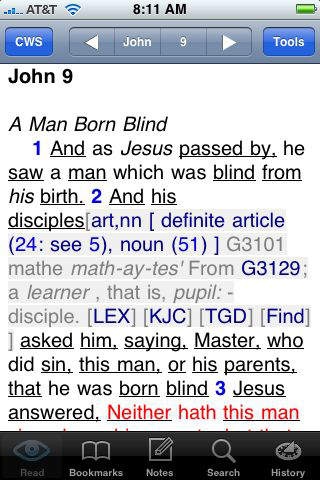
Includes the full red-letter text of both Zodhiates' Complete Word Study Old Testament and New Testament, text notes and book introductions, integrated Strongs Numbers and Strongs Dictionaries, grammatical codes, definitions, and full explanations, plus lexical aids for selected Strongs Numbers.
Mantis Bible Study 4.4.0 is the most advanced Bible Study Tool available for any mobile platform. A long list of unique features make Mantis Bible Study stand out as the premier tool for accessing the Bible on the iPhone:
Flexible content:
Comes with the full King James text
Works offline -- no network connection is necessary for reading and studying [Note: A network connection is required in order to load new resources purchased from our web site or to optionally backup and restore your data.]
Additional Bible translations, commentaries, dictionaries, devotionals and other books can be purchased and installed immediately. Check https://MantisBible.com for available titles
Great navigation options:
Quick History
Quick-reference chapter and section headers
Grid Mode
Tap the book name to navigate books
Tap the chapter number to navigate chapters
Tap-and-drag corners for quick access to volumes, books, chapters, and verses
Shake to close all open items
Auto-scroll the text for easy reading
Email any verse along with your personal notes
Fantastic study tools:
Build Your Own Study Bible (see http://MantisBible.com for details and an instructional video)
Easily create bookmarks, notes, and highlights
Inline Note Editor
Live Scripture References inside personal notes
Create, edit, and move bookmarks and bookmark folders
Unique "Analyze Verse" feature
Fast and flexible, yet simple search system
Save search results as a named folder full of bookmarks
Personal notes and translation notes appear inline with the text and can be toggled on and off
Highlighting Bar allows highlighting of individual words and phrases in 4 colors
Inline verse-display toggle links for all cross-reference links
Jump directly to Biblical text from cross references inside commentary, dictionary, devotional, or other books
Fantastic support for Bibles with integrated Strong's Numbers - tap a number to open a definition, tap it again to close it [Note: Strong's Number Support is only active for Bibles containing Strongs Numbers - which are sold separately]
Additional support for Strong's Numbers: drill-down to root word(s), tap to find where a number is used throughout Scripture, then tap and preview verses, integrated support for Brown-Driver-Briggs', Thayer's Greek Definitions, and other Strongs-based resources [Stongs-based resources are sold separately]
Plus much, much more!
Requires iOS 3.0 or later. Compatible with iPhone, iPad, and iPod touch.
About Mantis CWS Bible Study
The company that develops Mantis CWS Bible Study is Mantis Bible Company. The latest version released by its developer is 4.9.18.
To install Mantis CWS Bible Study on your iOS device, just click the green Continue To App button above to start the installation process. The app is listed on our website since 2009-07-12 and was downloaded 0 times. We have already checked if the download link is safe, however for your own protection we recommend that you scan the downloaded app with your antivirus. Your antivirus may detect the Mantis CWS Bible Study as malware if the download link is broken.
How to install Mantis CWS Bible Study on your iOS device:
- Click on the Continue To App button on our website. This will redirect you to the App Store.
- Once the Mantis CWS Bible Study is shown in the iTunes listing of your iOS device, you can start its download and installation. Tap on the GET button to the right of the app to start downloading it.
- If you are not logged-in the iOS appstore app, you'll be prompted for your your Apple ID and/or password.
- After Mantis CWS Bible Study is downloaded, you'll see an INSTALL button to the right. Tap on it to start the actual installation of the iOS app.
- Once installation is finished you can tap on the OPEN button to start it. Its icon will also be added to your device home screen.
Program Details
System requirements
Download information
Pricing
Version History
version 4.9.18
posted on 2009-07-12
Disclaimer
Official App Store Link
We do not host Mantis CWS Bible Study on our servers. We did not scan it for viruses, adware, spyware or other type of malware. This app is hosted by Apple and passed their terms and conditions to be listed there. We recommend caution when installing it.
The App Store link for Mantis CWS Bible Study is provided to you by apps112.com without any warranties, representations or guarantees of any kind, so access it at your own risk.
If you have questions regarding this particular app contact the publisher directly. For questions about the functionalities of apps112.com contact us.
